

PersonalSOC
Personal Security Operations Center
PersonalSOC gathers this device's logs and the state of its defenses into a report that helps you spot anything unusual. It is a small security operations center (SOC) for people without a dedicated security team, so you can understand your device's situation, with evidence, and decide what to do next.
It ships with the RoamSwitch installer, but it is a separate app with its own icon. It works even where RoamSwitch is not installed.
Check status with one button
Press Check status and PersonalSOC reads this device's logs (depending on the OS: SSH authentication, auditd, web, DNS, macOS unified log), your MCP settings and RoamSwitch's detection history, all read-only. It never raises its privileges; logs it cannot read are reported as unreadable.
Dashboard
See the overall risk (an estimate), counts by severity, occurrences by category, the trend over time and MITRE ATT&CK techniques at a glance, in charts.
Report
Sources, findings by category and IOCs (defanged) are compiled into a Markdown report. Times are shown in this device's local time, in a readable form.
Autonomous investigation by an LLM (optional, off by default)
When enabled, after the check an LLM investigates on its own and writes the report as an auditor. PersonalSOC gives the LLM only permitted read-only tools, and hands it no shell or files.
Scheduled runs (optional)
Registered with launchd on Mac and systemd (user) on Linux, it notifies you only when there is a detection that was not there last time (the notification contains only the count). root is never used.
10 languages
Japanese, English, German, Spanish, French, Italian, Korean, Portuguese, and Simplified and Traditional Chinese. It follows your OS language automatically.
RoamSwitch MCP integration
If RoamSwitch is installed, PersonalSOC pulls unresolved detections and failed configuration diagnostics from RoamSwitch's MCP server (read-only) and folds them into the same report as the log findings. Identical detections are merged into one, with a count and the latest time. During an LLM investigation it can call only RoamSwitch's read-only tools; anything that acts, such as run_*, is refused. Without RoamSwitch this source is simply skipped, and it can be turned off in settings.
Screenshots
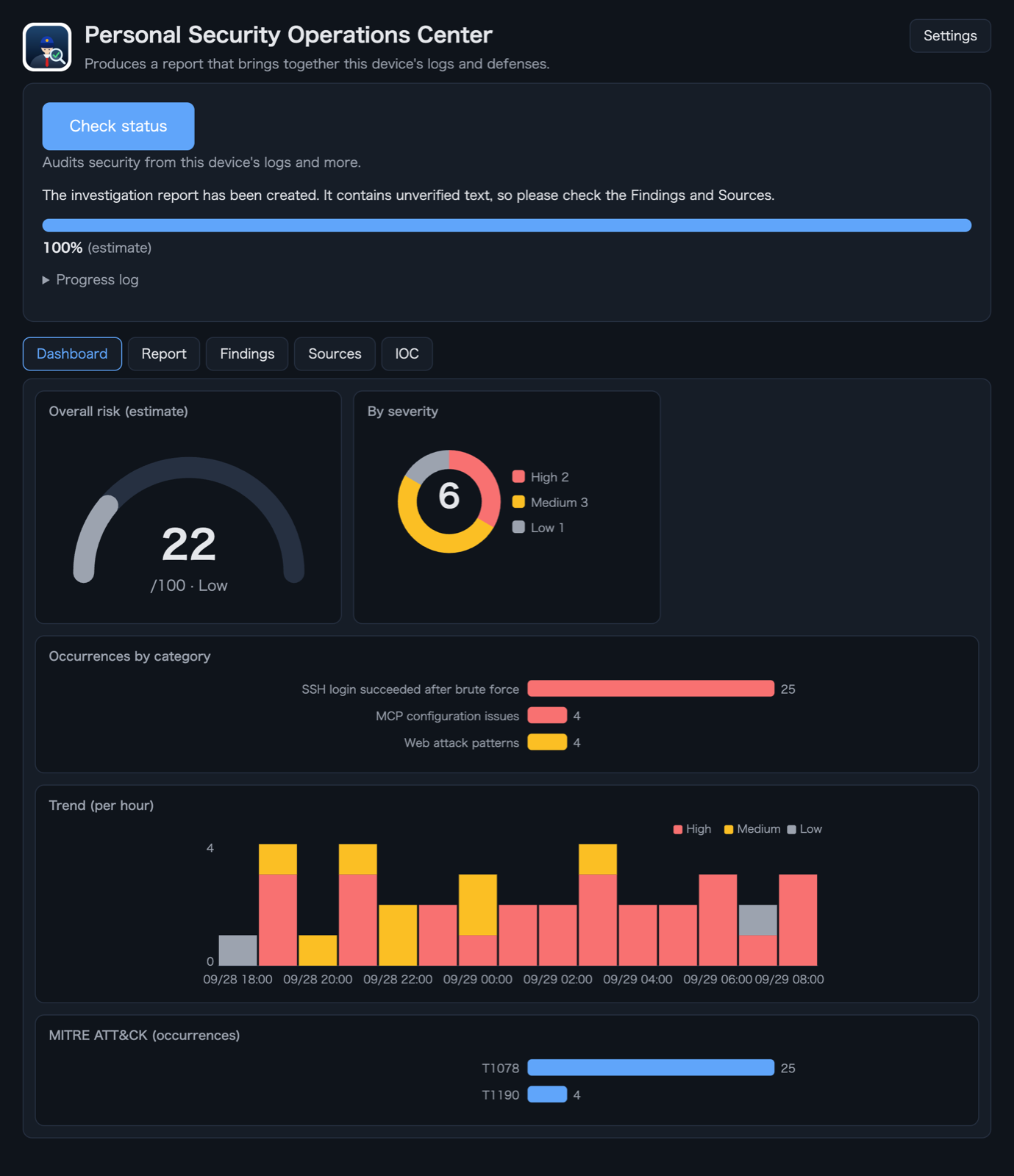
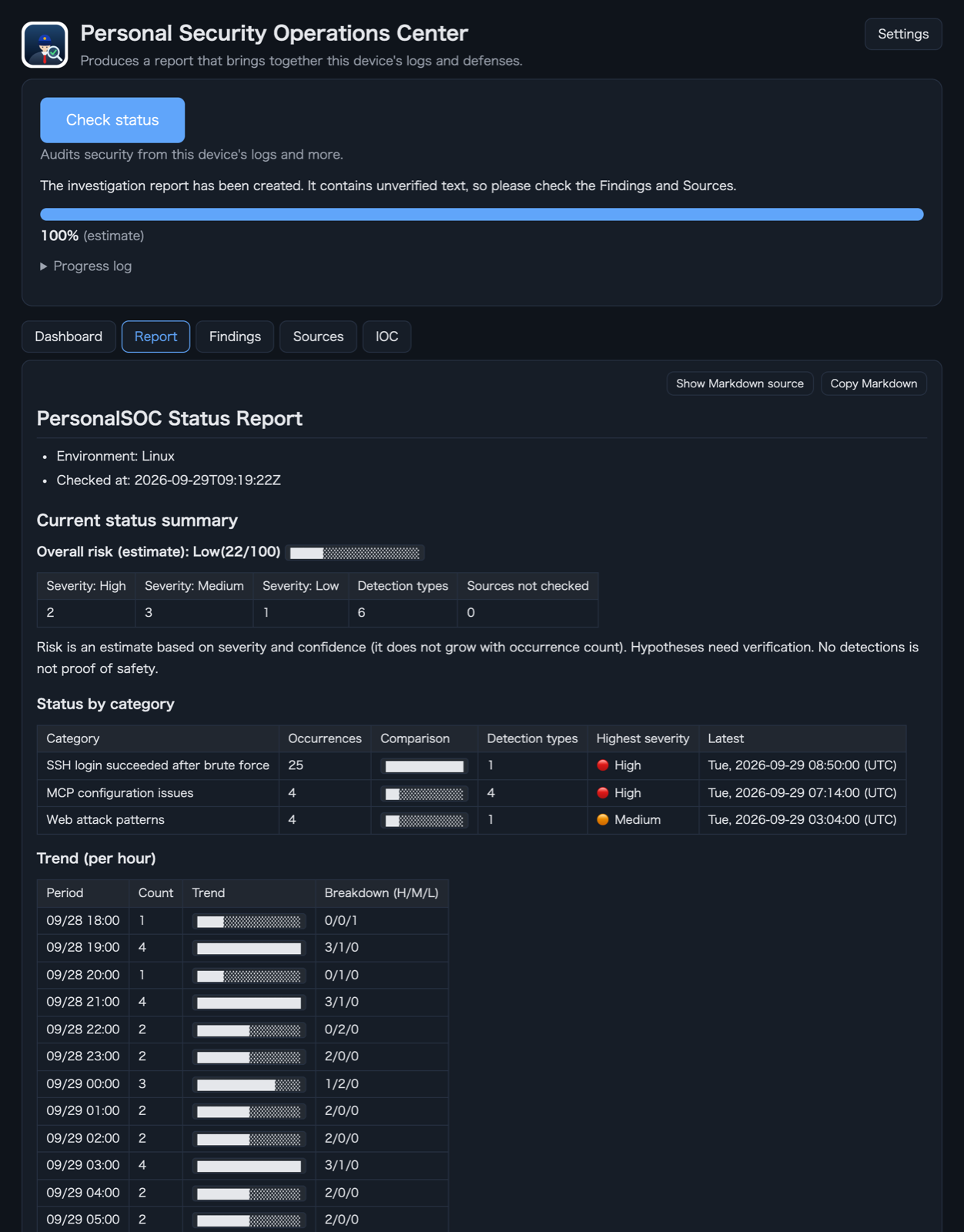
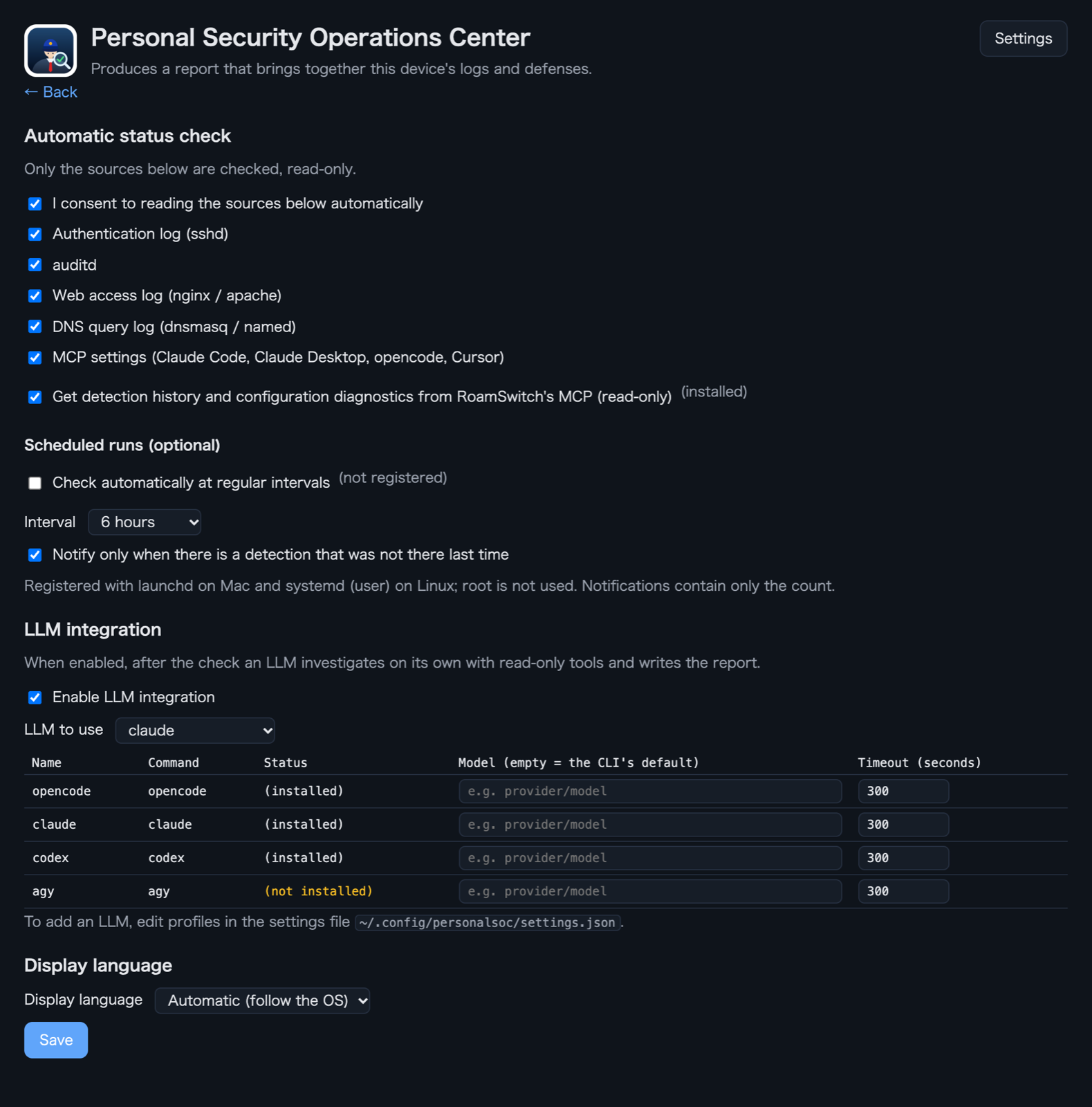
All data shown in these screens, such as IP addresses, is fictional.
Sample report
A sample of the report (with LLM integration on). You can copy it as Markdown and share it as is.
PersonalSOC 状況報告書
- 環境: Linux
- 確認時刻: 2026-09-29T09:19:22Z
現在の状況サマリー
総合リスク(目安): 低(22/100) █████░░░░░░░░░░░░░░░
| 深刻度「高」 | 深刻度「中」 | 深刻度「低」 | 検知の種類 | 確認できなかった収集元 |
|---|---|---|---|---|
| 2 | 3 | 1 | 6 | 0 |
リスクは深刻度と確度による目安(発生件数では増えない)。仮説は要裏取り。検出なしは安全の証明ではない。
分類ごとの状況
| Category | 発生件数 | 件数の比較 | 検知の種類 | 最高の深刻度 | 最新 |
|---|---|---|---|---|---|
| SSH 総当たり後の認証成功 | 25 | ████████████ | 1 | 🔴 高 | 2026年9月29日(火) 08:50:00 (UTC+9) |
| MCP 設定の問題 | 4 | ██░░░░░░░░░░ | 4 | 🔴 高 | 2026年9月29日(火) 07:14:00 (UTC+9) |
| Web 攻撃パターン | 4 | ██░░░░░░░░░░ | 1 | 🟠 中 | 2026年9月29日(火) 03:04:00 (UTC+9) |
発生の推移(時間ごと)
| 時期 | 件数 | 推移 | 内訳(高/中/低) |
|---|---|---|---|
| 09/28 18:00 | 1 | ████░░░░░░░░░░░░ | 0/0/1 |
| 09/28 19:00 | 4 | ████████████████ | 3/1/0 |
| 09/28 20:00 | 1 | ████░░░░░░░░░░░░ | 0/1/0 |
| 09/28 21:00 | 4 | ████████████████ | 3/1/0 |
| 09/28 22:00 | 2 | ████████░░░░░░░░ | 0/2/0 |
| 09/28 23:00 | 2 | ████████░░░░░░░░ | 2/0/0 |
| 09/29 00:00 | 3 | ████████████░░░░ | 1/2/0 |
| 09/29 01:00 | 2 | ████████░░░░░░░░ | 2/0/0 |
| 09/29 02:00 | 2 | ████████░░░░░░░░ | 2/0/0 |
| 09/29 03:00 | 4 | ████████████████ | 3/1/0 |
| 09/29 04:00 | 2 | ████████░░░░░░░░ | 2/0/0 |
| 09/29 05:00 | 2 | ████████░░░░░░░░ | 2/0/0 |
| 09/29 06:00 | 3 | ████████████░░░░ | 3/0/0 |
| 09/29 07:00 | 2 | ████████░░░░░░░░ | 1/0/1 |
| 09/29 08:00 | 3 | ████████████░░░░ | 3/0/0 |
直近の出来事(新しい順)
| 時刻 | Category | 深刻度 | Description |
|---|---|---|---|
| 2026年9月29日(火) 08:50:00 (UTC+9) | SSH 総当たり後の認証成功 | 🔴 高 | 203.0.113.45 から失敗 24 回の後に成功が 1 回。正規利用者の入力ミスの可能性もあるため、当該アカウント… |
| 2026年9月29日(火) 07:14:00 (UTC+9) | MCP 設定の問題 | 🟡 低 | -y により初回導入の確認が省かれている。 |
| 2026年9月29日(火) 05:57:00 (UTC+9) | MCP 設定の問題 | 🔴 高 | コマンドがシェルの -c 経由。引数の組み立て次第で任意コマンドが実行される。直接実行に変えること。 |
| 2026年9月29日(火) 03:04:00 (UTC+9) | Web 攻撃パターン | 🟠 中 | 198.51.100.7 から 4 件。種別: パストラバーサル/LFI、SQLインジェクション、機密ファイル探索。成功… |
| 2026年9月29日(火) 00:11:00 (UTC+9) | MCP 設定の問題 | 🟠 中 | npx が版を固定せずに取得して実行する。上流が乗っ取られると次回起動で悪性コードが動く |
| 2026年9月28日(月) 21:18:00 (UTC+9) | MCP 設定の問題 | 🟠 中 | 環境変数 API_TOKEN に値が直接書かれている |
MITRE ATT&CK
| 技術 | 発生件数 | 件数の比較 | 検知の種類 |
|---|---|---|---|
| T1078 | 1 | ████████████ | 1 |
| T1190 | 1 | ████████████ | 1 |
監査レポート
セキュリティ監査レポート
Summary
- 侵害が確定したとは言えませんが、優先して確認すべき点が2つあります。
- SSHの総当たりの後に、同じ送信元(203.0.113.45)からログインが成功しています。 失敗が24回続いた後の成功で、パスワードが破られた可能性があります(確度: 有力)。
- Webサーバーに、パス走査とSQLインジェクションを試す要求があります。応答は404で、成功の証拠はありません(確度: 仮説)。
推奨する対応
adminアカウントのパスワードを変更し、ログイン履歴を確認する。- SSHのパスワード認証をやめ、公開鍵認証にする。
- MCPの設定にある秘密の直書きを、環境変数の参照に置き換える。
収集元
| 確認したもの | 状態 | 検出 | 備考 |
|---|---|---|---|
| 認証ログ(sshd) | 読めた | 1 | |
| auditd | 該当なし | 0 | この環境に該当するログがない |
| Web アクセスログ(nginx / apache) | 読めた | 1 | |
| DNS クエリログ(dnsmasq / named) | 該当なし | 0 | この環境に該当するログがない |
| MCP の設定(Claude Code・Claude Desktop・opencode・Cursor) | 読めた | 4 | |
| RoamSwitch(MCP、読み取り専用) | 読めた | 0 |
検出事項
SSH 総当たり後の認証成功(検知 1 種類・発生 25 件)
| 深刻度 | 確度 | ATT&CK | Description | 件数 | 最新 |
|---|---|---|---|---|---|
| 🔴 高 | 有力 | T1078 | 203.0.113.45 から失敗 24 回の後に成功が 1 回。正規利用者の入力ミスの可能性もあるため、当該アカウントの直後の操作を確認すること。(根拠の行: 1, 2, 3, 4, 5, 6, 7, 8, 9, 10, 11, 12, 13, 14, 15, 16, 17, 18, 19, 20 ...) | 1 | 2026年9月29日(火) 08:50:00 (UTC+9) |
MCP 設定の問題(検知 4 種類・発生 4 件)
| 深刻度 | 確度 | ATT&CK | Description | 件数 | 最新 |
|---|---|---|---|---|---|
| 🔴 高 | 有力 | - | コマンドがシェルの -c 経由。引数の組み立て次第で任意コマンドが実行される。直接実行に変えること。 | 1 | 2026年9月29日(火) 05:57:00 (UTC+9) |
| 🟠 中 | 確定 | - | npx が版を固定せずに取得して実行する。上流が乗っ取られると次回起動で悪性コードが動く(ラグプル)。版またはハッシュを固定すること。 | 1 | 2026年9月29日(火) 00:11:00 (UTC+9) |
| 🟠 中 | 有力 | - | 環境変数 API_TOKEN に値が直接書かれている(値は表示しない)。環境変数参照かキーチェーンに移すこと。 | 1 | 2026年9月28日(月) 21:18:00 (UTC+9) |
| 🟡 低 | 確定 | - | -y により初回導入の確認が省かれている。 | 1 | 2026年9月29日(火) 07:14:00 (UTC+9) |
Web 攻撃パターン(検知 1 種類・発生 4 件)
| 深刻度 | 確度 | ATT&CK | Description | 件数 | 最新 |
|---|---|---|---|---|---|
| 🟠 中 | 有力 | T1190 | 198.51.100.7 から 4 件。種別: パストラバーサル/LFI、SQLインジェクション、機密ファイル探索。成功応答は観測されていない。(根拠の行: 1, 2, 4, 5) | 1 | 2026年9月29日(火) 03:04:00 (UTC+9) |
IOC(無害化表記)
- IP:
198[.]51[.]100[.]7 - IP:
203[.]0[.]113[.]45 - ドメイン:
malware[.]example
調査の経過
LLM が調べた理由と、PersonalSOC が実行したツール。
- 検出事項の一覧を確認する
list_findings
- SSHの成功ログインの根拠を確認する
get_evidence(1)
PersonalSOC Status Report
- Environment: Linux
- Checked at: 2026-09-29T09:19:22Z
Current status summary
Overall risk (estimate): Low(22/100) █████░░░░░░░░░░░░░░░
| Severity: High | Severity: Medium | Severity: Low | Detection types | Sources not checked |
|---|---|---|---|---|
| 2 | 3 | 1 | 6 | 0 |
Risk is an estimate based on severity and confidence (it does not grow with occurrence count). Hypotheses need verification. No detections is not proof of safety.
Status by category
| Category | Occurrences | Comparison | Detection types | Highest severity | Latest |
|---|---|---|---|---|---|
| SSH login succeeded after brute force | 25 | ████████████ | 1 | 🔴 High | Tue, 2026-09-29 08:50:00 (UTC) |
| MCP configuration issues | 4 | ██░░░░░░░░░░ | 4 | 🔴 High | Tue, 2026-09-29 07:14:00 (UTC) |
| Web attack patterns | 4 | ██░░░░░░░░░░ | 1 | 🟠 Medium | Tue, 2026-09-29 03:04:00 (UTC) |
Trend (per hour)
| Period | Count | Trend | Breakdown (H/M/L) |
|---|---|---|---|
| 09/28 18:00 | 1 | ████░░░░░░░░░░░░ | 0/0/1 |
| 09/28 19:00 | 4 | ████████████████ | 3/1/0 |
| 09/28 20:00 | 1 | ████░░░░░░░░░░░░ | 0/1/0 |
| 09/28 21:00 | 4 | ████████████████ | 3/1/0 |
| 09/28 22:00 | 2 | ████████░░░░░░░░ | 0/2/0 |
| 09/28 23:00 | 2 | ████████░░░░░░░░ | 2/0/0 |
| 09/29 00:00 | 3 | ████████████░░░░ | 1/2/0 |
| 09/29 01:00 | 2 | ████████░░░░░░░░ | 2/0/0 |
| 09/29 02:00 | 2 | ████████░░░░░░░░ | 2/0/0 |
| 09/29 03:00 | 4 | ████████████████ | 3/1/0 |
| 09/29 04:00 | 2 | ████████░░░░░░░░ | 2/0/0 |
| 09/29 05:00 | 2 | ████████░░░░░░░░ | 2/0/0 |
| 09/29 06:00 | 3 | ████████████░░░░ | 3/0/0 |
| 09/29 07:00 | 2 | ████████░░░░░░░░ | 1/0/1 |
| 09/29 08:00 | 3 | ████████████░░░░ | 3/0/0 |
Recent events (newest first)
| Time | Category | Severity | Details |
|---|---|---|---|
| Tue, 2026-09-29 08:50:00 (UTC) | SSH login succeeded after brute force | 🔴 High | 1 success |
| Tue, 2026-09-29 07:14:00 (UTC) | MCP configuration issues | 🟡 Low | -y skips the confirmation for the first installation. |
| Tue, 2026-09-29 05:57:00 (UTC) | MCP configuration issues | 🔴 High | The command runs through a shell's -c. Depending on how argu… |
| Tue, 2026-09-29 03:04:00 (UTC) | Web attack patterns | 🟠 Medium | 4 request |
| Tue, 2026-09-29 00:11:00 (UTC) | MCP configuration issues | 🟠 Medium | npx fetches and runs the package without pinning a version. … |
| Mon, 2026-09-28 21:18:00 (UTC) | MCP configuration issues | 🟠 Medium | The environment variable API_TOKEN has its value written dir… |
MITRE ATT&CK
| Technique | Occurrences | Comparison | Detection types |
|---|---|---|---|
| T1078 | 1 | ████████████ | 1 |
| T1190 | 1 | ████████████ | 1 |
Audit report
Security audit report
Summary
- A compromise is not confirmed, but two points need attention first.
- A login succeeded from the same source (203.0.113.45) right after an SSH brute-force run. Success after 24 failures suggests the password may have been guessed (confidence: likely).
- The web server received path-traversal and SQL injection attempts. All returned 404, so there is no evidence of success (confidence: hypothesis).
Recommended actions
- Change the
adminpassword and review its login history.- Turn off SSH password authentication and use public keys.
- Replace the hardcoded secret in the MCP configuration with an environment variable reference.
Sources
| Checked item | Status | Found | Note |
|---|---|---|---|
| Authentication log (sshd) | Read | 1 | |
| auditd | Not present | 0 | No matching log in this environment |
| Web access log (nginx / apache) | Read | 1 | |
| DNS query log (dnsmasq / named) | Not present | 0 | No matching log in this environment |
| MCP settings (Claude Code, Claude Desktop, opencode, Cursor) | Read | 4 | |
| RoamSwitch (MCP, read-only) | Read | 0 |
Findings
SSH login succeeded after brute force (1 type(s), 25 occurrence(s))
| Severity | Confidence | ATT&CK | Details | Count | Latest |
|---|---|---|---|---|---|
| 🔴 High | Likely | T1078 | 1 success(es) after 24 failures from 203.0.113.45. It may be a legitimate user's typo, so check what the account did right afterwards.(evidence lines: 1, 2, 3, 4, 5, 6, 7, 8, 9, 10, 11, 12, 13, 14, 15, 16, 17, 18, 19, 20 ...) | 1 | Tue, 2026-09-29 08:50:00 (UTC) |
MCP configuration issues (4 type(s), 4 occurrence(s))
| Severity | Confidence | ATT&CK | Details | Count | Latest |
|---|---|---|---|---|---|
| 🔴 High | Likely | - | The command runs through a shell's -c. Depending on how arguments are assembled, arbitrary commands can run. Change it to run the program directly. | 1 | Tue, 2026-09-29 05:57:00 (UTC) |
| 🟠 Medium | Confirmed | - | npx fetches and runs the package without pinning a version. If the upstream is hijacked, malicious code runs at the next launch (rug pull). Pin the version or a hash. | 1 | Tue, 2026-09-29 00:11:00 (UTC) |
| 🟠 Medium | Likely | - | The environment variable API_TOKEN has its value written directly (the value is not shown). Move it to an environment reference or the keychain. | 1 | Mon, 2026-09-28 21:18:00 (UTC) |
| 🟡 Low | Confirmed | - | -y skips the confirmation for the first installation. | 1 | Tue, 2026-09-29 07:14:00 (UTC) |
Web attack patterns (1 type(s), 4 occurrence(s))
| Severity | Confidence | ATT&CK | Details | Count | Latest |
|---|---|---|---|---|---|
| 🟠 Medium | Likely | T1190 | 4 request(s) from 198.51.100.7. Types: Path traversal / LFI, SQL injection, Probing for sensitive files. No successful response was observed.(evidence lines: 1, 2, 4, 5) | 1 | Tue, 2026-09-29 03:04:00 (UTC) |
IOCs (defanged)
- IP:
198[.]51[.]100[.]7 - IP:
203[.]0[.]113[.]45 - Domain:
malware[.]example
Investigation trail
The reasons the LLM gave and the tools PersonalSOC ran.
- Review the list of findings
list_findings
- Check the evidence for the successful SSH login
get_evidence(1)
The IP addresses and logs shown are all fictional. Reports come out in the display language (10 languages).
How to launch it
Mac: open PersonalSOC in the Applications folder (it has its own icon, separate from RoamSwitch).
Linux: open PersonalSOC from your application menu (it has its own icon). From a terminal, run personalsoc-app.
Command line: personalsoc scan --report (report), personalsoc scan --llm <name> (LLM investigates on its own).
Privacy and scope
PersonalSOC analyzes logs entirely on this device. It opens no listening ports, and its window loads no external sites.
LLM integration is off by default. When enabled, PersonalSOC starts the LLM command you chose (opencode, claude, codex, agy, etc.) and passes it the details of detections and the log lines behind them (secrets such as keys and tokens are masked). Depending on that command's settings, the content may be sent to an external service. Where it goes and how it is handled follows the LLM you chose and its provider's terms.
RoamSwitch's "Zero-Telemetry" (it never sends your traffic or logs anywhere) describes RoamSwitch itself. Communication that occurs when you enable PersonalSOC's LLM integration is not covered by it. With LLM integration left off, PersonalSOC never sends the contents of your logs off the device.
License
PersonalSOC is licensed under the Apache License 2.0 and is not covered by the RoamSwitch license agreement (EULA). The license text, NOTICE and the list of bundled third-party software are inside the app on Mac (PersonalSOC.app/Contents/Resources) and in /usr/share/licenses/personalsoc/ on Linux.
Requirements and updates
macOS 12 or later. On Linux it needs WebKitGTK 4.1 (libwebkit2gtk-4.1), which the deb and rpm packages install automatically; on Arch (AUR) install webkit2gtk-4.1 as an optional dependency. On Mac you can update from Settings, under Updates. It connects only when you press the button, and the downloaded file is verified with a signature before it is installed. On Linux it is included in RoamSwitch package updates.