
A Dedicated Sensor Node for Your LAN: “RoamSwitch Sensor”
RoamSwitch Sensor is a dedicated LAN node that audits the RoamSwitch endpoints on the same LAN (Mac / Linux Client / Server Edition) from the outside. It checks what a host looks like to another machine on the LAN (open ports, services exposed without authentication, footholds for lateral movement), which the host can never see through its own self-diagnosis. It also provides a device inventory of the LAN and ARP spoofing detection.
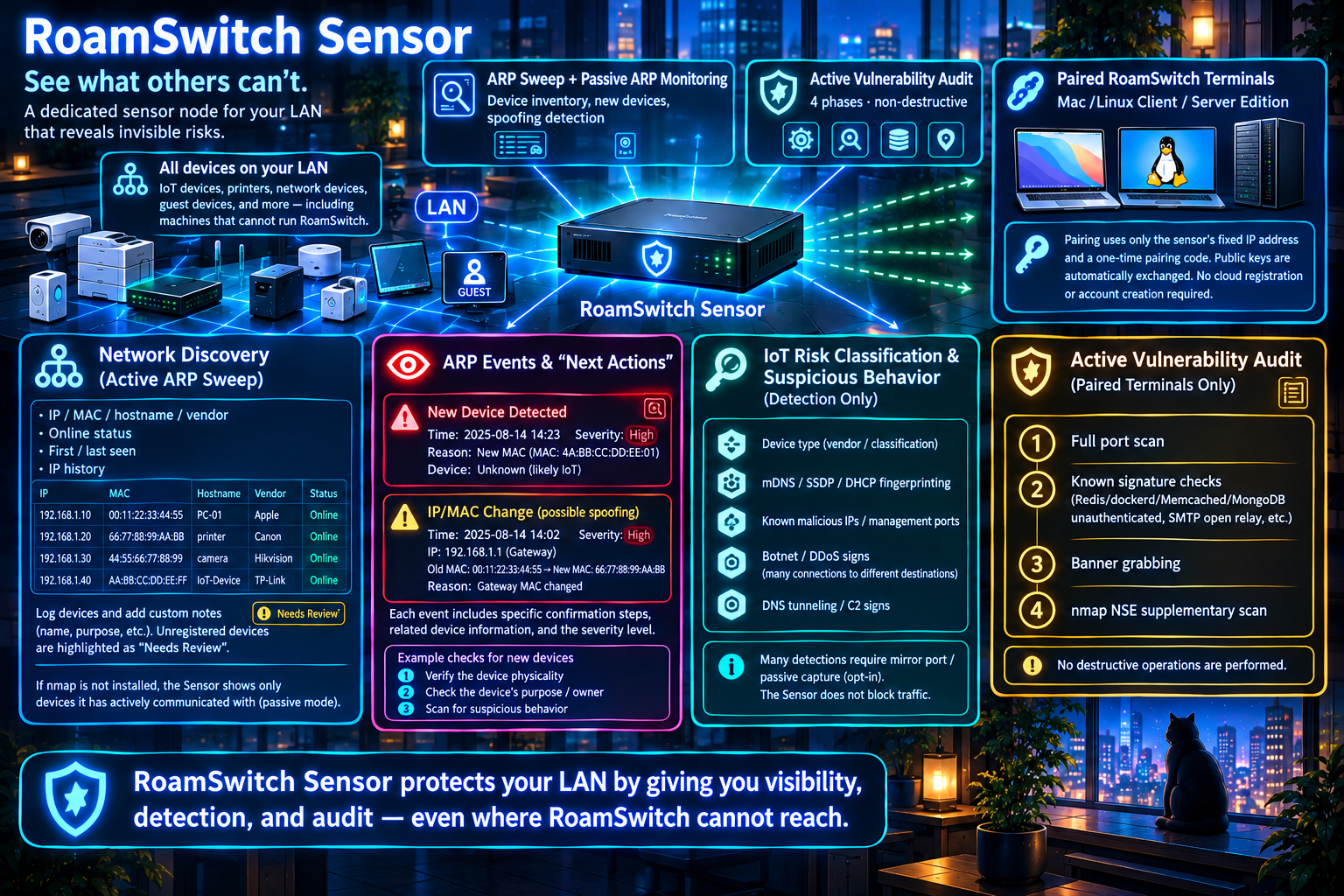
🛡️ Active Vulnerability Audit (paired endpoints only)
Full port scan → known-signature checks (unauthenticated Redis/dockerd/Memcached/MongoDB/Elasticsearch/CouchDB/Jenkins/VNC exposure, SMBv1 and missing SMB signing, RDP without NLA, SMTP open-relay, etc.) → generic banner grab → nmap NSE supplementary scan — four phases, entirely non-destructive.
📋 Network Composition (Active ARP Sweep)
Finds the devices on your LAN with an ARP sweep. It builds an inventory of IP, MAC, hostname, vendor, online status, first/last seen and IP history, and lets you record a free-text name or purpose per device. Devices with no note are highlighted as needing attention, so the list doubles as an asset-inventory check. Without nmap installed it falls back to a passive mode that lists only devices the Sensor has itself communicated with.
👁️ ARP Events with “What to Do Next”
New-device appearances and MAC changes on a known IP (a sign of ARP spoofing) are shown with a timestamp, a severity (critical to info), the reasons behind it, who is involved and concrete steps to verify. A MAC change on the gateway IP is rated critical. With the opt-in passive capture enabled it also detects one device sending ARP requests for many IPs (internal reconnaissance).
🔎 Awareness of Other LAN Devices & Suspicious Behavior (Detection Only)
Shows, as reference information, MAC vendor and device category, model identification from mDNS/SSDP/DHCP self-announcements, connections to known-malicious IPs or admin ports, signs of botnet or DDoS participation (contacting many destinations), and signs of DNS tunneling/C2. Most of this needs the opt-in passive-capture setup (e.g. a mirror port), and the Sensor never blocks traffic.
🔑 Pairing-Code Pairing (Ed25519, fixed IP, certificate pin)
Trusts nothing by default. Entering the 10-minute, single-use pairing code the Sensor operator issued, together with the Sensor’s fixed IP address and the certificate fingerprint shown on the Sensor’s screen, establishes mutual trust in both directions in a single step. Public keys are exchanged automatically, so you never need to know them in advance. No cloud account or registration required.
🔐 Control-API Hardening (TLS 1.3, certificate pin, replay protection)
Control traffic with endpoints (TCP 50543) is accepted over TLS 1.3 (control.tls: off / optional (default) / required). The certificate is self-signed; trust comes from the fingerprint shown on the Sensor’s screen, which the endpoint pins — it is never fetched over the network. Audit-request signatures use the v2 format with a timestamp and nonce, so replays are refused, and pairing-code guessing and signature failures lock out the source IP. Whether legacy v1 signatures are accepted and which IP the API listens on are configurable too.
🖥️ A 10-Language TUI That Covers Every Feature
The interactive TUI reaches every CLI subcommand, every daemon IPC method and every configuration key (a config editor, TLS status and certificate rotation, manual pairing, a notification test), collector operations and every event view (including passive monitoring, IoT behaviour, suspicious traffic and advisories) in 10 languages. The CLI is Japanese and English. Audit reports and exports can be produced in 10 languages too.
📅 Scheduled Audits and Change Detection (opt-in)
Automatically audits every paired endpoint on a schedule and shows what changed since the previous audit — new findings, resolved ones and newly open ports. If every port that was open is suddenly not visible, it is reported as suspected unreachable, not as fixed. Even unattended, the Sensor confirms before and after each audit that the endpoint's MAC address is still the one it authenticated with, and skips the audit if the IP address has gone to a different device. Off by default; you set the interval and the time window.
📣 Notifications and Audit Evidence (opt-in)
Send regressions, new devices, ARP spoofing and more to webhooks (Slack, Discord, Teams and others) and syslog (RFC 5424). Pairing, unpairing, audits and configuration changes are recorded with who did them in a tamper-evident operation log (a hash chain), and audit results, the device inventory and the log can be exported as CSV, JSON or an HTML report (save it as PDF from a browser). Every notification destination is one you configure; by default no device data or audit results are sent anywhere. Detection data (the CVE map and the nmap NSE database) is fetched daily from the update service; you can turn that off with updates.fetch_cve_map, and that traffic carries no device or audit data.
🗂️ Aggregating Several Sensors (Central Collector, opt-in)
For organizations with Sensors at several sites, a central collector that gathers signed summaries is included (disabled by default). It provides a per-site dashboard and CSV export, and detects a Sensor’s audit log being truncated or rewound. Devices without RoamSwitch (unmanaged devices) can be included in the summary classified as an “unpaired RoamSwitch host” or an “unknown device” (collector.send_unmanaged_devices; never any traffic content). It accepts only signed requests from Sensors you have enrolled, and refuses to be exposed beyond the LAN without TLS.
If the Sensor itself needs to be hardened against attack, we recommend installing RoamSwitch for Linux Server Edition separately on the same machine — the two run as fully independent processes.
Audit Report Example
An example of the report written by roamswitch-sensor export all --format html (the e key in the TUI). It is a single HTML file: open it in a browser and choose “Save as PDF” to get a PDF you can hand to auditors.
RoamSwitch Sensor audit report
| Created (UTC) | 2026-09-20T02:30:12.508136294+00:00 |
|---|---|
| Site | HQ 3F server room |
| Sensor public key | +kbYCoN5jJSykTAr8zDv/VCs2SdBcrwYbkCrzCRgsLM= |
| Audit log | Integrity check: OK (no tampering), 18 entries, head #18 771a265c58fa2f0a8990bc6be79ff5259d96a76a0a3fea472f308df02eaa087f |
Latest audit result per device
| Device | Address | Run time | Findings | Open ports |
|---|---|---|---|---|
| web-prod-01 | 192.168.20.21 | 2026-09-20T02:00:43.318204577+00:00 | 1 item | 2 |
| db-prod-01 | 192.168.20.22 | 2026-09-20T02:01:14.774390215+00:00 | 2 items | 3 |
| dev-laptop-07 | 192.168.20.35 | 2026-09-20T02:02:07.120765432+00:00 | No issues | 1 |
Findings
| Date/time | Device | Port | Description | Recommended action |
|---|---|---|---|---|
| 2026-09-20T02:01:14.774390215+00:00 | db-prod-01 | 22 | SSH version banner exposed This SSH server exposes its version banner on connect. The banner itself is normal behavior, but it gives attackers a clue for narrowing down known vulnerabilities. | Update SSH to the latest version and minimize the banner content if needed. |
| 2026-09-20T02:01:14.774390215+00:00 | db-prod-01 | 6379 | Known vulnerability: CVE-2021-32626 (Redis) NVD description (original English): Redis is an open source, in-memory database that persists on disk. In affected versions specially crafted Lua scripts executing in Redis can cause the heap-based Lua stack to be overflowed, due to incomplete checks for this condition. This can result with heap corruption and potentially remote code execution. This problem exists in all versions of Redis with Lua scripting support, starting from 2.6. The problem is fixed in versions 6.2.6, 6.0.16 and 5.0.14. | Urgently upgrade Redis to a version not affected by CVE-2021-32626, and until then restrict unauthenticated network access. |
| 2026-09-20T02:00:43.318204577+00:00 | web-prod-01 | 22 | SSH version banner exposed This SSH server exposes its version banner on connect. The banner itself is normal behavior, but it gives attackers a clue for narrowing down known vulnerabilities. | Update SSH to the latest version and minimize the banner content if needed. |
| 2026-09-19T08:33:18.402118906+00:00 | db-prod-01 | 22 | SSH version banner exposed This SSH server exposes its version banner on connect. The banner itself is normal behavior, but it gives attackers a clue for narrowing down known vulnerabilities. | Update SSH to the latest version and minimize the banner content if needed. |
Device ledger (all devices observed on the LAN)
| MAC | IP | Hostname | Vendor | RoamSwitch managed | Notes |
|---|---|---|---|---|---|
| 00:1b:8b:3c:9a:07 | 192.168.20.1 | _gateway | NEC Platforms | Unmanaged | HQ gateway router |
| 7c:8b:ca:61:d2:4e | 192.168.20.2 | TP-Link Technologies | Unmanaged | 3F Wi-Fi access point | |
| e4:e7:49:2b:70:c1 | 192.168.20.3 | Hewlett Packard | Unmanaged | 2F multifunction printer | |
| 90:61:ae:17:4d:e2 | 192.168.20.21 | Intel Corporate | Managed | Production web server | |
| 90:61:ae:17:4d:f9 | 192.168.20.22 | Intel Corporate | Managed | Production DB server | |
| 04:20:9a:cc:31:8f | 192.168.20.31 | sensor-hq-01 | Panasonic AVC Networks Company | Unmanaged | RoamSwitch-Sensor |
| a0:c9:a0:5e:83:2b | 192.168.20.35 | Murata Manufacturing | Managed | Development laptop | |
| 8e:0f:95:a2:64:5d | 192.168.20.44 | Unmanaged | |||
| 5e:e2:59:1d:c8:03 | 192.168.20.45 | Unmanaged | |||
| a8:3b:76:9c:20:e4 | 192.168.20.52 | Cloud Network Technology Singapore PTE. | Unmanaged |
Operations and approval log
| # | Date/time | Actor | Operation | Scope | Details |
|---|---|---|---|---|---|
| 18 | 2026-09-20T02:02:07.120765432+00:00 | scheduler | audit_completed | dev-laptop-07 (Q9mW3sLp0xVc) | trigger=scheduled host=192.168.20.35 findings=0 open_ports=1 new_findings=0 resolved_findings=0 |
| 17 | 2026-09-20T02:02:05.402816653+00:00 | scheduler | audit_started | dev-laptop-07 (Q9mW3sLp0xVc) | host=192.168.20.35 |
| 16 | 2026-09-20T02:01:14.774390215+00:00 | scheduler | audit_completed | db-prod-01 (Zt4Kb8NwY1eR) | trigger=scheduled host=192.168.20.22 findings=2 open_ports=3 new_findings=1 resolved_findings=0 |
| 15 | 2026-09-20T02:01:12.117409552+00:00 | scheduler | audit_started | db-prod-01 (Zt4Kb8NwY1eR) | host=192.168.20.22 |
| 14 | 2026-09-20T02:00:43.318204577+00:00 | scheduler | audit_completed | web-prod-01 (Xk3F9aLm2QzB) | trigger=scheduled host=192.168.20.21 findings=1 open_ports=2 new_findings=1 resolved_findings=0 |
| 13 | 2026-09-20T02:00:41.029385714+00:00 | scheduler | audit_started | web-prod-01 (Xk3F9aLm2QzB) | host=192.168.20.21 |
| 12 | 2026-09-19T09:11:40.318842077+00:00 | cli:uid=1000 | config_changed | schedule.window_end_hour | value=5 |
| 11 | 2026-09-19T09:11:32.640571920+00:00 | cli:uid=1000 | config_changed | schedule.window_start_hour | value=1 |
| 10 | 2026-09-19T09:10:02.205197346+00:00 | cli:uid=1000 | config_changed | schedule.enabled | value=true |
| 9 | 2026-09-19T08:47:19.771263084+00:00 | control_api: | pair | dev-laptop-07 (Q9mW3sLp0xVc) | endpoint redeemed an operator-issued pairing code and was added to the audit scope |
| 8 | 2026-09-19T08:46:52.093718455+00:00 | cli:uid=1000 | pairing_code_issued | single-use, valid 10 minutes | |
| 7 | 2026-09-19T08:33:18.402118906+00:00 | cli:uid=1000 | audit_completed | db-prod-01 (Zt4Kb8NwY1eR) | trigger=manual host=192.168.20.22 findings=1 open_ports=2 new_findings=1 resolved_findings=0 |
| 6 | 2026-09-19T08:33:15.588240391+00:00 | cli:uid=1000 | audit_started | db-prod-01 (Zt4Kb8NwY1eR) | manual audit; host=192.168.20.22 |
| 5 | 2026-09-19T08:31:07.336914608+00:00 | control_api: | pair | db-prod-01 (Zt4Kb8NwY1eR) | endpoint redeemed an operator-issued pairing code and was added to the audit scope |
| 4 | 2026-09-19T08:30:41.874526103+00:00 | cli:uid=1000 | pairing_code_issued | single-use, valid 10 minutes | |
| 3 | 2026-09-19T08:12:26.152083967+00:00 | control_api: | pair | web-prod-01 (Xk3F9aLm2QzB) | endpoint redeemed an operator-issued pairing code and was added to the audit scope |
| 2 | 2026-09-19T08:11:58.960417225+00:00 | cli:uid=1000 | pairing_code_issued | single-use, valid 10 minutes | |
| 1 | 2026-09-19T08:00:03.415602838+00:00 | daemon | daemon_started | version 0.3.4 |
RoamSwitch Sensor Audit Report
| Generated (UTC) | 2026-09-20T02:30:12.508136294+00:00 |
|---|---|
| Site | HQ – 3F server room |
| Sensor public key | +kbYCoN5jJSykTAr8zDv/VCs2SdBcrwYbkCrzCRgsLM= |
| Audit log | Integrity check: OK (no tampering detected) — 18 entries, head #18 771a265c58fa2f0a8990bc6be79ff5259d96a76a0a3fea472f308df02eaa087f |
Latest audit per endpoint
| Endpoint | Address | Timestamp | Findings | Open ports |
|---|---|---|---|---|
| web-prod-01 | 192.168.20.21 | 2026-09-20T02:00:43.318204577+00:00 | 1 finding(s) | 2 |
| db-prod-01 | 192.168.20.22 | 2026-09-20T02:01:14.774390215+00:00 | 2 finding(s) | 3 |
| dev-laptop-07 | 192.168.20.35 | 2026-09-20T02:02:07.120765432+00:00 | clean | 1 |
Findings
| When | Endpoint | Port | Finding | Recommendation |
|---|---|---|---|---|
| 2026-09-20T02:01:14.774390215+00:00 | db-prod-01 | 22 | SSH Version Banner Disclosed This SSH server discloses its version banner on connect. This is normal SSH behavior, but the banner gives an attacker a starting point to look up known vulnerabilities for that version. | Keep SSH updated to the latest version, and minimize the banner's detail if your SSH implementation allows it. |
| 2026-09-20T02:01:14.774390215+00:00 | db-prod-01 | 6379 | Known Vulnerability: CVE-2021-32626 (Redis) Redis is an open source, in-memory database that persists on disk. In affected versions specially crafted Lua scripts executing in Redis can cause the heap-based Lua stack to be overflowed, due to incomplete checks for this condition. This can result with heap corruption and potentially remote code execution. This problem exists in all versions of Redis with Lua scripting support, starting from 2.6. The problem is fixed in versions 6.2.6, 6.0.16 and 5.0.14. | Upgrade Redis to a version not affected by CVE-2021-32626 as soon as possible, and restrict unauthenticated network access to it in the meantime. |
| 2026-09-20T02:00:43.318204577+00:00 | web-prod-01 | 22 | SSH Version Banner Disclosed This SSH server discloses its version banner on connect. This is normal SSH behavior, but the banner gives an attacker a starting point to look up known vulnerabilities for that version. | Keep SSH updated to the latest version, and minimize the banner's detail if your SSH implementation allows it. |
| 2026-09-19T08:33:18.402118906+00:00 | db-prod-01 | 22 | SSH Version Banner Disclosed This SSH server discloses its version banner on connect. This is normal SSH behavior, but the banner gives an attacker a starting point to look up known vulnerabilities for that version. | Keep SSH updated to the latest version, and minimize the banner's detail if your SSH implementation allows it. |
Device inventory (every device observed on the LAN)
| MAC | IP | Hostname | Vendor | Managed | Note |
|---|---|---|---|---|---|
| 00:1b:8b:3c:9a:07 | 192.168.20.1 | _gateway | NEC Platforms | no | HQ gateway router |
| 7c:8b:ca:61:d2:4e | 192.168.20.2 | TP-Link Technologies | no | 3F Wi-Fi access point | |
| e4:e7:49:2b:70:c1 | 192.168.20.3 | Hewlett Packard | no | 2F multifunction printer | |
| 90:61:ae:17:4d:e2 | 192.168.20.21 | Intel Corporate | yes | Production web server | |
| 90:61:ae:17:4d:f9 | 192.168.20.22 | Intel Corporate | yes | Production database server | |
| 04:20:9a:cc:31:8f | 192.168.20.31 | sensor-hq-01 | Panasonic AVC Networks Company | no | RoamSwitch-Sensor |
| a0:c9:a0:5e:83:2b | 192.168.20.35 | Murata Manufacturing | yes | Development laptop | |
| 8e:0f:95:a2:64:5d | 192.168.20.44 | no | |||
| 5e:e2:59:1d:c8:03 | 192.168.20.45 | no | |||
| a8:3b:76:9c:20:e4 | 192.168.20.52 | Cloud Network Technology Singapore PTE. | no |
Operation & approval log
| # | When | Actor | Action | Target | Detail |
|---|---|---|---|---|---|
| 18 | 2026-09-20T02:02:07.120765432+00:00 | scheduler | audit_completed | dev-laptop-07 (Q9mW3sLp0xVc) | trigger=scheduled host=192.168.20.35 findings=0 open_ports=1 new_findings=0 resolved_findings=0 |
| 17 | 2026-09-20T02:02:05.402816653+00:00 | scheduler | audit_started | dev-laptop-07 (Q9mW3sLp0xVc) | host=192.168.20.35 |
| 16 | 2026-09-20T02:01:14.774390215+00:00 | scheduler | audit_completed | db-prod-01 (Zt4Kb8NwY1eR) | trigger=scheduled host=192.168.20.22 findings=2 open_ports=3 new_findings=1 resolved_findings=0 |
| 15 | 2026-09-20T02:01:12.117409552+00:00 | scheduler | audit_started | db-prod-01 (Zt4Kb8NwY1eR) | host=192.168.20.22 |
| 14 | 2026-09-20T02:00:43.318204577+00:00 | scheduler | audit_completed | web-prod-01 (Xk3F9aLm2QzB) | trigger=scheduled host=192.168.20.21 findings=1 open_ports=2 new_findings=1 resolved_findings=0 |
| 13 | 2026-09-20T02:00:41.029385714+00:00 | scheduler | audit_started | web-prod-01 (Xk3F9aLm2QzB) | host=192.168.20.21 |
| 12 | 2026-09-19T09:11:40.318842077+00:00 | cli:uid=1000 | config_changed | schedule.window_end_hour | value=5 |
| 11 | 2026-09-19T09:11:32.640571920+00:00 | cli:uid=1000 | config_changed | schedule.window_start_hour | value=1 |
| 10 | 2026-09-19T09:10:02.205197346+00:00 | cli:uid=1000 | config_changed | schedule.enabled | value=true |
| 9 | 2026-09-19T08:47:19.771263084+00:00 | control_api: | pair | dev-laptop-07 (Q9mW3sLp0xVc) | endpoint redeemed an operator-issued pairing code and was added to the audit scope |
| 8 | 2026-09-19T08:46:52.093718455+00:00 | cli:uid=1000 | pairing_code_issued | single-use, valid 10 minutes | |
| 7 | 2026-09-19T08:33:18.402118906+00:00 | cli:uid=1000 | audit_completed | db-prod-01 (Zt4Kb8NwY1eR) | trigger=manual host=192.168.20.22 findings=1 open_ports=2 new_findings=1 resolved_findings=0 |
| 6 | 2026-09-19T08:33:15.588240391+00:00 | cli:uid=1000 | audit_started | db-prod-01 (Zt4Kb8NwY1eR) | manual audit; host=192.168.20.22 |
| 5 | 2026-09-19T08:31:07.336914608+00:00 | control_api: | pair | db-prod-01 (Zt4Kb8NwY1eR) | endpoint redeemed an operator-issued pairing code and was added to the audit scope |
| 4 | 2026-09-19T08:30:41.874526103+00:00 | cli:uid=1000 | pairing_code_issued | single-use, valid 10 minutes | |
| 3 | 2026-09-19T08:12:26.152083967+00:00 | control_api: | pair | web-prod-01 (Xk3F9aLm2QzB) | endpoint redeemed an operator-issued pairing code and was added to the audit scope |
| 2 | 2026-09-19T08:11:58.960417225+00:00 | cli:uid=1000 | pairing_code_issued | single-use, valid 10 minutes | |
| 1 | 2026-09-19T08:00:03.415602838+00:00 | daemon | daemon_started | version 0.3.4 |
All machine names, MAC addresses, IP addresses and keys shown are fictional. The report body can be produced in any of 10 languages; a Japanese and an English example are shown here.