 RoamSwitch
by Lafine Systems Design
RoamSwitch
by Lafine Systems Design
- Product ▾
- Docs ▾
- Legal & Policies ▾
- Support ▾
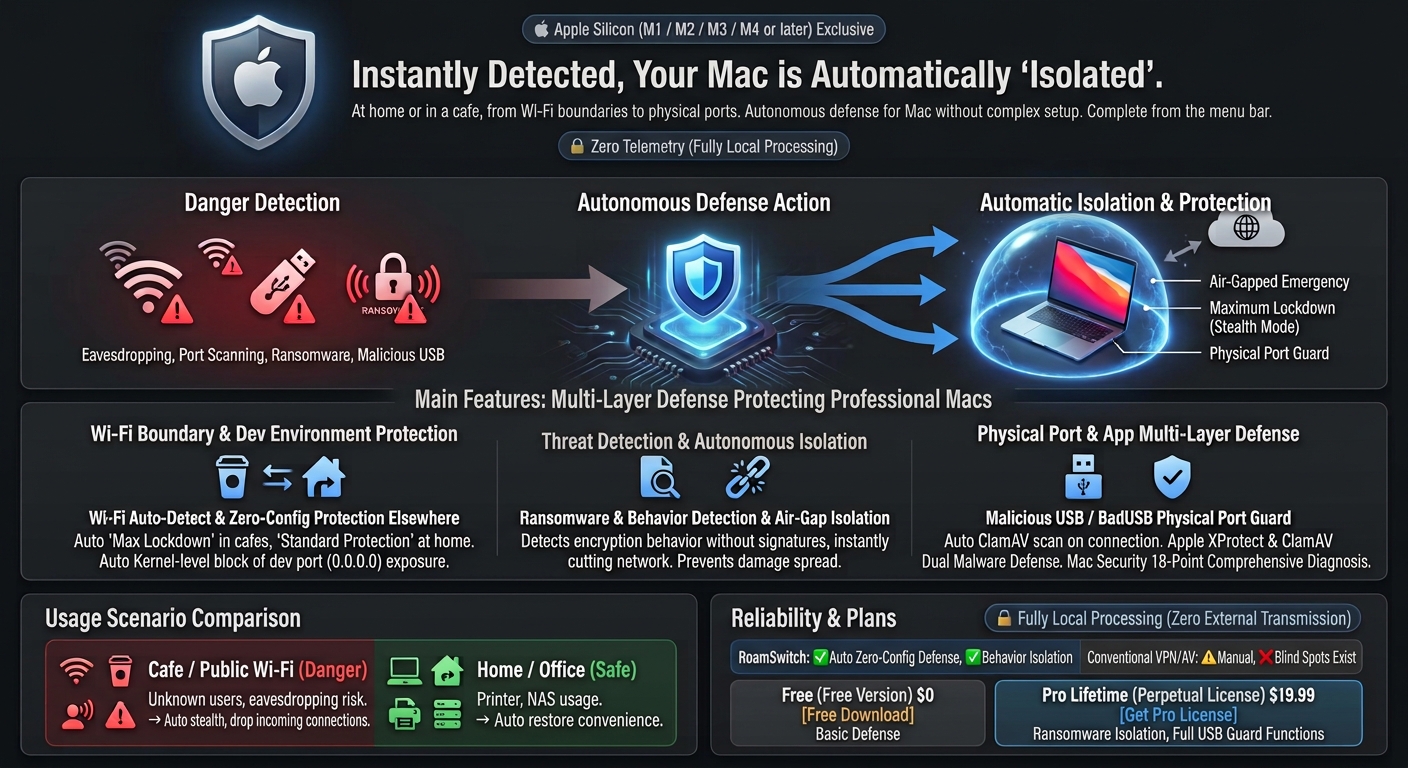
At home or at a café, from your Wi-Fi perimeter to physical ports — autonomous Mac defense without complex setup. From public Wi-Fi eavesdropping protection to ransomware behavior detection with air-gap isolation and rogue USB guards, all from one menu bar app.
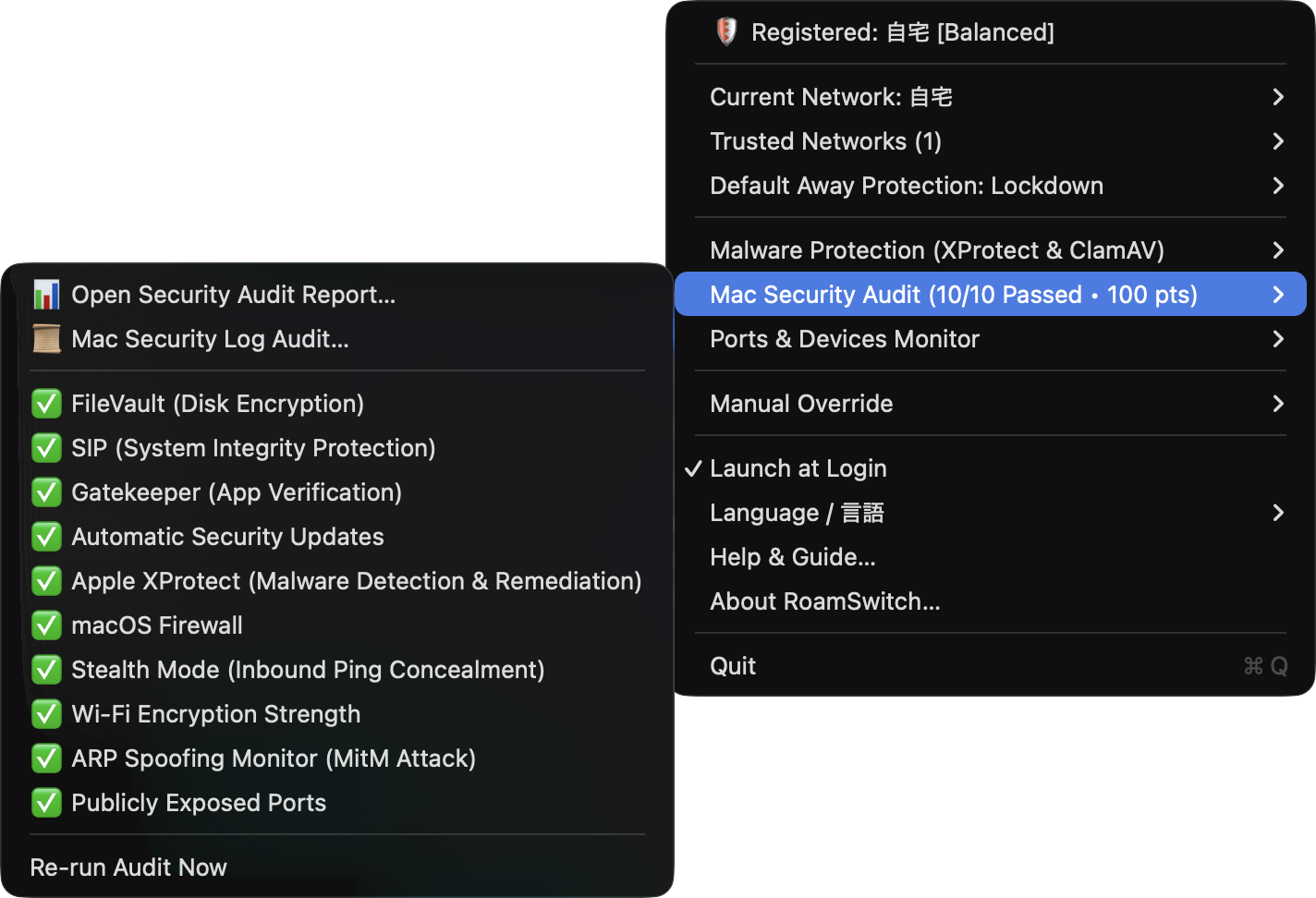
Instant access to all 18 audit statuses, malware scans, and open port checks right from the menu bar
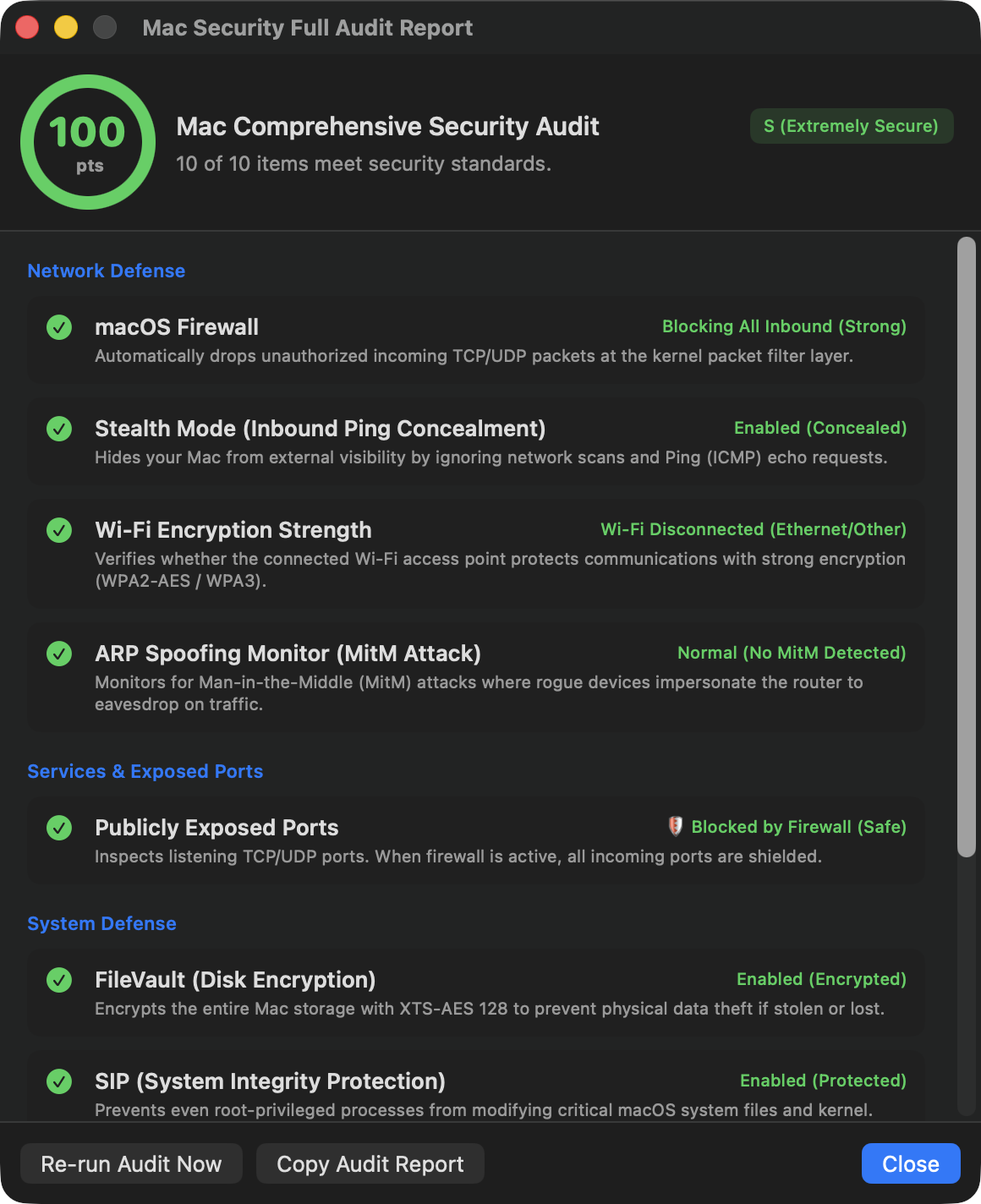
Detailed status for FileVault, SIP, Gatekeeper, Firewall, ARP spoofing, and system integrity
Whether you travel with your MacBook or stay mostly at home or the office, you never have to think about security settings again.
Public Wi-Fi networks expose your Mac to untrusted devices, putting you at risk of port scanning, unauthorized AirDrop probes, and local file access.
RoamSwitch Action: Detects unregistered Wi-Fi instantly and applies its Application Firewall lockdown. Drops all unsolicited incoming packets, rendering your Mac completely stealth. (Outbound communication, such as web browsing, continues to work as usual.)Running dev servers (Vite, Next.js, Node, Python, Docker) on 0.0.0.0 on public Wi-Fi exposes your unauthenticated local apps to everyone on the LAN.
RoamSwitch Action: Passively audits open listening ports and drops unauthorized LAN connections at the kernel layer, keeping your development environment safe.In trusted networks, you need smooth access to printers, NAS file servers, and AirDrop. Toggling firewall settings manually is tedious and prone to forgetting.
RoamSwitch Action: Identifies the router's gateway MAC address and automatically restores standard protection. Enjoy full productivity without friction or manual reconfiguration.Ransomware from a phishing email or a sketchy download can't be stopped just because you're on your safe home Wi-Fi. Once it hits, file encryption can spread to your home NAS or other PCs in seconds.
Autonomous cyber defense engineered for MacBooks carrying sensitive code and data.
Securely recognizes the router's gateway MAC address. The instant you disconnect from trusted networks, the Application Firewall engages maximum lockdown. (Outbound communication, such as web browsing, continues to work as usual.)
Instant 100-point audit covering FileVault, SIP, Gatekeeper, Firewall, Wi-Fi encryption, ARP spoofing, stealth mode, and Apple Rapid Security Responses (RSR).
The moment a new port that wasn't seen before is exposed to the external LAN, it's auto-blocked — no signature needed (opt-in). Unauthenticated database services like Redis/MongoDB get an instant alert the moment they bind to 0.0.0.0, and dev servers such as Node.js/Vite/Docker are passively audited for CORS wildcards and missing auth.
Rapidly extracts sudo authentication failures, SSH intrusion attempts, Gatekeeper block history, and Apple XProtect remediation logs from macOS's internal unified log, visualized on a graphical timeline.
Beyond verifying Apple's official XProtect status, checks file and app notarization signatures and quarantine attributes, and can run on-demand scans with the open-source ClamAV engine. Every external storage connection — including allow-listed devices — is automatically scanned, switching to full access only once confirmed safe.
On an untrusted network it pins the gateway, IPv6 router and on-link DNS MAC into the neighbour table, so a spoofed ARP/NDP cannot move the route (preventive lock). On top of that, the instant the gateway's physical address (MAC address) changes suspiciously, communication is cut off in an emergency (air-gap isolation) to prevent eavesdropping and tampering. Opt-in, and can be released anytime once safety is confirmed.
Detects ransomware-specific behavior — like sudden mass file encryption — without relying on signatures. The instant it's detected, your Mac is cut off from the network (air-gap isolation) to autonomously stop the damage from spreading to other devices on your home LAN.
Intercepts and blocks keystrokes from unapproved USB keyboards and modified cables (Rubber Ducky, etc.) to prevent malicious automated command injection. Automatically performs full ClamAV scans when USB storage is connected.
Monitors file downloads from Safari, Chrome, Mail, Slack, and Discord via FSEvents. Scans quarantined files with ClamAV and quarantines infected files immediately.
Automatically switches to secure DNS (Quad9 / Cloudflare Security) on untrusted Wi-Fi to block name resolution of malware C2 and phishing domains. The scope (untrusted only / always on) is configurable.
Away from trusted networks, route all traffic through an encrypted WireGuard config or a Tailscale exit node. A pf kill-switch drops any clear-text leak outside the tunnel and never fails open if the tunnel drops. The primary man-in-the-middle defense (opt-in).
Determines the destination of outbound connections from the DNS name, the TLS SNI and the HTTP Host header, and warns about or blocks connections to phishing / scam sites (block by default, and it works for DoH browsers). A NEFilter system extension inspects the real post-resolution flow, so it never edits /etc/hosts. In warn mode a no-answer is fail-closed. Verdicts are local.
Checks downloaded files against the industry-standard EICAR test signature and well-documented reverse-shell one-liners — works even without ClamAV installed. Also watches for new LaunchAgent/LaunchDaemon registrations in real time, flagging any that invoke a raw script interpreter directly. Requires no EndpointSecurity entitlement.
Defends against "ClickFix" — a fake error or verification screen that talks you into pasting and running a command yourself in Terminal. Regardless of where you paste it (Terminal, Script Editor, Spotlight, or anywhere else), RoamSwitch watches the clipboard and, the moment a known-malicious pattern is copied, clears it and warns you. Pro adds an optional layer that also watches command history and can emergency-lockdown the network on detection.
Look back through the notifications RoamSwitch has sent (security log-audit anomalies, ClickFix detections, and the like) instead of only catching them the moment they appear. Entries older than the retention window are pruned automatically.
Detects the instant a container starts with --privileged mode or a /var/run/docker.sock bind-mount, and sends a notification (Pro, opt-in). Flags the risky configuration only — no automatic blocking.
Paste text to instantly audit it for leaked API keys and tokens. Also recursively scans an entire folder — like a source checkout — automatically skipping .git, node_modules, and similar directories. Everything runs entirely on-device.
Checks installed Homebrew packages and your project's dependencies (npm, PyPI, crates.io, and 4 more ecosystems) against a locally-held known-CVE map. No network activity at all.
No signatures required — it judges and acts autonomously based on behavior alone.
Detects ransomware-specific behavior, like sudden mass file encryption, in real time — without relying on known virus signatures.
The instant it's detected, your Mac is cut off from the network in an emergency — halting communication with command servers and the encryption itself, no delay.
Autonomously stops the infection from spreading to other devices, like a home NAS or a family member's or colleague's PC. You can lift it anytime once it's confirmed safe.
Diagnostics don't have to stay inside RoamSwitch. Read them straight from an AI client, or straight from your own app.
Encountered an unfamiliar warning, an emergency air-gap disconnection, or an unexpected USB ejection? Built-in official MCP server allows AI assistants (Claude, OpenCode, Antigravity) to provide root-cause analysis and step-by-step remediation advice using RoamSwitch's knowledge base. Supports 100% offline querying with local LLMs (such as Ollama) even during network lockdowns.
MCP server and detection logic — source published (GitHub, MIT) →
RoamSwitchKit is a free, open-source client that lets you read RoamSwitch's security diagnostics directly from Swift. No need to build your own ARP monitoring or port scanning — just ask “is this network safe right now?” from your own app. One line via Swift Package Manager, read-only.
The complete list of operations the root helper can run, every outbound network path, the license-activation cryptography, and the threat model with its non-goals — documented at a level you can check against the code. Includes commands to verify it against the shipping binary.
Comprehensive coverage of system integrity, perimeter defense, and listening ports.
Defends the critical perimeter blind spot when transitioning across Wi-Fi networks.
| Features & Defense Scope | RoamSwitch |
macOS Built-in | Commercial VPN | Traditional Antivirus |
|---|---|---|---|---|
| Auto Wi-Fi Switching Zero-Config Defense | ✅ Fully Automatic (Gateway MAC / 0s) | ❌ Requires Manual Steps | ⚠️ Requires VPN (LAN exposed) | ❌ Unsupported (Scan only) |
| Dev Port (0.0.0.0) LAN Blocking | ✅ Kernel-level Drop | ⚠️ Requires Manual Rules | ❌ Cannot Defend LAN | ❌ Unsupported |
| ARP Spoofing (MitM) Monitoring | ✅ Real-time Detection | ❌ Unsupported | ⚠️ Partial Encryption Only | ❌ Unsupported |
| 18-Point Comprehensive Audit | ✅ 100-Point Score & Report | ❌ Scattered Across Settings | ❌ Unsupported | ❌ Unsupported |
| Ransomware behavior detection & autonomous isolation | ✅ Emergency air-gap on detection | ⚠️ Known variants only (XProtect) | ❌ Unsupported | ⚠️ Only in some behavior-monitoring products |
| Rogue USB / BadUSB physical port defense | ✅ Auto-block + full ClamAV scan on connect | ❌ Unsupported | ❌ Unsupported | ❌ Not supported (some premium tiers only) |
| VPN tunnel + kill-switch (fail-closed) | ✅ WireGuard / Tailscale + pf kill-switch (no leak if it drops) | ❌ Unsupported | ⚠️ Provides the tunnel; kill-switch depends on the client | ❌ Unsupported |
| Privacy (Zero Telemetry) | ✅ Zero Telemetry (100% Local) | ⚠️ Telemetry to Apple | ❌ Logs Kept on VPN Servers | ❌ Cloud Telemetry Uploads |
| Battery & CPU Impact | ⚡ Practically Zero (Event-driven) | ⚡ Zero | ⚠️ Constant Crypto Drain | ❌ Heavy Background Scans |
No recurring subscription fees. Own lifetime protection for your Macs with a single payment.
Essential Mac defense and manual security audits for everyday users.
Setup takes about 2 minutes, with one macOS approval step.
For engineers and professionals carrying MacBooks. Advanced autonomous defense stopping threats instantly.
One-time purchase, no subscription. As a digital product, refunds are generally not available — please confirm it works in your environment with the free version first. Payment is completed on Stripe’s secure page.
Compatible with macOS 13.0 Ventura or later. Set up in minutes from download.